


Looking to upgrade your home security with a modern, keyless solution? This comprehensive smart lock installation guide is tailored for Canadian homeowners. It explores everything from the benefits of digital and electronic locks, to DIY vs. professional installation, compatibility with home automation systems, and how to choose the best wireless locks for Canadian weather. Whether you’re upgrading to keyless entry or enhancing your smart home security, this guide has the practical tips and expert advice you need.
Why Smart Lock Installation Is a Smart Move for Canadian Homes
In today’s digital age, more Canadian homeowners are choosing smart locks to enhance their home security. With features like keyless entry, remote access, and integration with smart home devices, smart lock installation is no longer just a tech trend — it’s becoming a standard for modern living.
Understanding Smart Locks
Smart locks are electronic locks that allow you to lock and unlock your doors without using a traditional key. They can be operated via smartphone apps, keypads, biometrics, or even voice commands. From wireless locks to Bluetooth and Wi-Fi enabled systems, there are many options available to suit your lifestyle and security needs.
Smart Lock Benefits for Canadian Homeowners
- Keyless Entry: Say goodbye to lost or forgotten keys. With digital locks, you control access using a PIN code, smartphone, or fingerprint.
- Remote Access: Check your door status or unlock it from anywhere — ideal for letting in family, guests, or service providers.
- Increased Security: Many smart locks offer encryption and tamper alerts, keeping your home safer than traditional locks.
- Custom Access Codes: Give temporary or permanent codes to family, friends, or cleaners and monitor who comes and goes.
- Smart Home Integration: Easily connect with security cameras, alarm systems, and smart assistants like Alexa or Google Home.
- Weather-Resistant Options: Many models are designed to withstand Canada’s harsh winters and varying temperatures.
Why It Matters in Canada
Given our unique climate, Canadian homeowners need modern locks that can handle extreme cold, snow, and moisture. Many smart locks come with weatherproof features, making them ideal for residences from Vancouver to Toronto to St. John’s. Plus, with our longer winters and shorter daylight hours, enhanced security is a must for peace of mind.
Choosing the Right Smart Lock for Your Home
Before jumping into smart lock installation, it’s essential to choose the right type of lock for your door and lifestyle. Not all digital locks are created equal, and different homes have different requirements based on the door material, location, and usage frequency.
Types of Smart Locks
1. Keypad Locks
These locks feature a numeric keypad and allow entry through a PIN code. Great for families and rental properties, keypad locks are simple to use and don’t require a smartphone.
2. Bluetooth Locks
Bluetooth-enabled locks connect to your phone when you’re nearby. They provide hands-free entry but are limited to short-range control.
3. Wi-Fi Enabled Locks
These offer remote access from anywhere with internet connectivity. They’re ideal for homeowners who travel often or want to monitor their homes from afar.
4. Biometric Locks
Using fingerprint recognition, biometric locks offer a high level of security and convenience. Some models also include PIN entry as a backup.
5. Hybrid Locks
These combine multiple entry methods such as keys, PIN codes, and biometric options. They’re perfect for households with varying tech comfort levels.
Factors to Consider Before Buying
- Door Compatibility: Check if your current door and deadbolt can accommodate a smart lock. Some models require specific dimensions or backset measurements.
- Power Source: Most smart locks use batteries. Choose models with long battery life and low-battery notifications.
- Connectivity: Decide whether you want Bluetooth, Wi-Fi, or Z-Wave compatibility, especially if you plan to integrate it into a home automation system.
- Weather Resistance: Make sure the lock is rated for outdoor use and can handle Canadian weather fluctuations.
- Security Features: Look for encryption, auto-lock, tamper alerts, and two-factor authentication for added protection.
Top Brands Popular in Canada
Some of the most trusted brands for electronic locks include:
- Schlage
- Yale
- August
- Weiser
- Kwikset
These brands offer a wide range of models suitable for single-family homes, condos, and rental units, and many are available through Canadian retailers or online platforms.
DIY vs. Professional Smart Lock Installation
Once you’ve selected your smart lock, the next step is deciding whether to install it yourself or hire a professional. While many smart locks are designed for easy setup, certain models or door types may require expert help.
DIY Smart Lock Installation
Pros:
- Cost-effective — you save on labour costs.
- Many locks come with step-by-step instructions and online tutorials.
- Immediate control over installation timing and pace.
Cons:
- May void warranty if not installed properly.
- Risk of damaging your door or lock mechanism.
- Could miss important security features or settings.
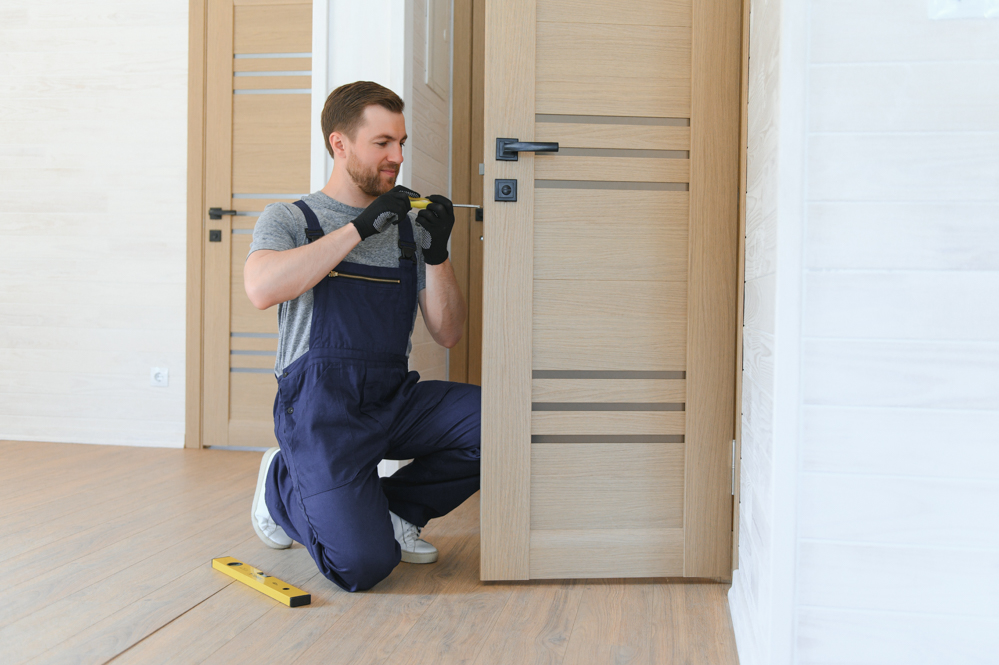
Basic Tools You May Need:
- Screwdriver (usually Phillips)
- Drill (if new holes are required)
- Measuring tape
- Level
- Chisel (for adjusting strike plate or latch)
When to Hire a Professional
If you’re unsure about measurements, electrical compatibility, or integration with your home’s smart system, hiring a professional is a wise choice. This ensures your lock is properly installed, secure, and functioning as intended.
For professional locksmith services across Canada, Fortify Services offers experienced, licensed technicians who can install your smart lock quickly and correctly — even in the middle of a snowstorm!
Benefits of Professional Installation
- Expertise: Get the job done right the first time, whether you’re installing on wood, metal, or composite doors.
- Code Compliance: Ensure the installation meets Canadian building codes and insurance standards.
- Warranty Protection: Many manufacturers require professional installation for full warranty coverage.
- System Integration: A pro can connect your lock with existing home automation systems for seamless operation.
If you need expert locksmith services, Fortify Services is your trusted partner for smart lock upgrades and other security enhancements tailored to your home and region.
Preparing Your Home for a Smart Lock Upgrade
Before starting your lock upgrade, it’s important to prepare your door and entryway to ensure a smooth installation. This step is often overlooked but can make a big difference in how well your new modern locks perform.
Check the Door Alignment
Doors that stick or sag can affect the functionality of your smart lock. Make sure your door opens and closes smoothly, and that the deadbolt aligns perfectly with the strike plate. Cold Canadian winters can cause wood doors to expand or contract, so check alignment seasonally.
Measure Properly
Take accurate measurements of your existing deadbolt setup. Most smart locks fit standard 2 ⅜” or 2 ¾” backsets, but it’s always best to double-check before purchasing. Measure the thickness of your door as well — most locks fit doors between 1 ⅜” and 2″ thick.
Power Considerations
Most electronic locks are battery-operated, using AA or CR123 batteries. Ensure you have fresh batteries on hand, and keep spares nearby, especially during winter months when battery life can be affected by cold temperatures.
Wi-Fi and Signal Strength
If your lock requires Wi-Fi, make sure your router’s signal reaches the front door. Brick or concrete walls common in some older Canadian homes may interfere with connectivity. You might need a Wi-Fi extender to ensure reliable performance.
Smartphone App Setup
Download the lock’s companion app before installation. Set up your account, connect your lock, and test functions like auto-lock, remote access, and notifications. Some apps offer integration with Google Home, Alexa, Apple HomeKit, or SmartThings.
Safety and Security Tips
- Keep a backup key or code: In case of battery failure or app issues, always have a backup method of entry.
- Update firmware: Check for software updates regularly to maintain security and performance.
- Use strong access codes: Avoid simple codes like 1234 or your birthdate.
- Enable alerts: Get notified of failed entry attempts or if the door is left unlocked for too long.
Contact our certified technicians if you’d like help preparing your home for a smart lock upgrade. We can assess your entryway and recommend the best options for your home and lifestyle.
Smart Lock Maintenance and Troubleshooting Tips
Once your smart lock is installed and running, it’s important to keep it in good working condition. Regular maintenance and knowing how to troubleshoot common issues will help ensure your smart home security system stays reliable year-round — especially through unpredictable Canadian weather.
Routine Maintenance for Your Smart Lock
1. Battery Checks
Most electronic locks will notify you when the battery is low, either through the app or with visual/audible alerts on the lock itself. In Canada, cold weather can reduce battery life, so it’s a good idea to check and replace batteries before winter hits. Use high-quality alkaline or lithium batteries, and keep spare sets indoors at room temperature.
2. Clean the Lock Mechanism
Dust, moisture, and salt from Canadian winters can affect the performance of your modern locks. Gently clean the exterior with a soft cloth and avoid using harsh cleaners or solvents. For keypads, wipe down the buttons regularly to prevent dirt build-up that could interfere with code entry.
3. Software Updates
Like your smartphone, smart locks often receive firmware updates to improve performance and security. Enable automatic updates in the lock’s app or manually check for new firmware every few months. Keeping your system current helps protect against security vulnerabilities.
4. Physical Alignment Checks
Seasonal changes can cause door frames to shift or swell. If you notice resistance when locking or unlocking, check the alignment and adjust the strike plate or hinges as needed. A misaligned door can stress your smart lock’s motor and reduce its lifespan.
Common Smart Lock Issues and How to Fix Them
1. Smart Lock Not Responding
If your lock isn’t responding to app commands or keypad input, check the battery level first. If that’s not the issue, reboot the lock by removing and reinserting the batteries. If using Wi-Fi or Bluetooth, make sure your phone is connected and the signal is strong.
2. Connectivity Problems
Canadian homes with thick walls or older construction may experience weak Wi-Fi signals at the front door. Try moving your router closer or using a Wi-Fi extender. For Bluetooth locks, ensure your phone’s Bluetooth is on and within range.
3. App Malfunctions
If the app crashes or can’t connect, try reinstalling it or restarting your phone. Check for updates to both the app and your phone’s operating system. Also, verify that permissions (e.g., location access) are enabled for the app to function properly.
4. Lock Doesn’t Engage Properly
This can be a sign of a misaligned deadbolt or a door that doesn’t close flush. Check the strike plate and door alignment. Tighten any loose screws and ensure the latch moves freely without resistance.
If you’re still having issues, contact our certified technicians for a full diagnostic and repair service. Fortify Services offers professional support across Canada to keep your locks operating smoothly.
Integrating Smart Locks into Your Home Automation System
One of the biggest advantages of smart lock installation is the ability to integrate your lock into a larger home automation ecosystem. Whether you’re already using smart thermostats, lights, or security cameras, adding smart locks enhances convenience and security.
Smart Lock Compatibility with Home Automation Platforms
- Google Home: Many digital locks are compatible with Google Home, allowing voice commands like “Hey Google, lock the front door.”
- Amazon Alexa: With Alexa integration, you can lock and unlock doors using voice commands or routines that include other smart devices.
- Apple HomeKit: For iPhone users, smart locks that support HomeKit can be controlled via Siri or the Apple Home app.
- Samsung SmartThings: A powerful hub for managing multiple devices, SmartThings can automate your locks alongside lights, sensors, and more.
Creating Smart Routines and Automations
1. Entry and Exit Routines
Set your smart lock to trigger other devices when you enter or leave your home. For example, unlocking the front door can turn on the lights and adjust the thermostat.
2. Night Mode
Create a nightly routine that locks all doors, turns off the lights, and arms your security system at a set time every evening.
3. Geofencing
Some smart lock apps use geofencing to detect when you’re approaching or leaving home, automatically locking or unlocking the door based on your phone’s location.
4. Access Notifications
Receive real-time alerts when someone enters your home using a custom access code or app. This is particularly helpful for tracking kids, guests, or cleaners.
If you’re unsure how to connect your new lock to your existing smart devices, Fortify Services offers expert locksmith services that include full integration support for home automation systems.
Smart Lock Security: Best Practices for Canadian Households
While smart locks offer advanced features and greater convenience, it’s essential to follow best practices to ensure your home stays secure. With the right habits and settings, you can maximize the protection your wireless locks provide.
Use Strong, Unique Access Codes
For keypad and app-controlled locks, create complex, non-obvious codes. Avoid birthdates, addresses, or repeated digits. Change codes periodically and delete old or unused ones.
Enable Two-Factor Authentication
Most smart lock apps offer two-factor authentication (2FA), which adds an extra layer of protection. This requires you to verify your identity through a text message or email before making changes to your lock settings.
Monitor Lock Activity
Review access logs regularly to track who entered your home and when. This is especially useful for rental properties or when allowing temporary access to service providers.
Avoid Public Networks
When using your smartphone to control your smart lock, avoid connecting to public Wi-Fi networks, which can be insecure. Stick to your mobile data or trusted home network for safer access.
Physical Security Still Matters
Even with keyless entry, don’t neglect the physical aspects of door security. Reinforce your strike plate with long screws, keep hinges tight, and install a peephole or video doorbell for added visibility.
Stay Informed on Updates and Recalls
Subscribe to product updates from your smart lock manufacturer. In rare cases, vulnerabilities can be discovered, and staying informed ensures you’re protected with the latest patches and advice.
Concerned about your smart lock’s configuration? If you need expert locksmith support, Fortify Services can review your setup and recommend ways to boost your home’s smart security.
Smart Locks for Canadian Rental Properties and Airbnb Units
Smart locks are a game-changer for landlords, property managers, and Airbnb hosts across Canada. With remote access and customizable codes, digital locks make it easy to manage tenant or guest entry without physical keys.
Benefits for Rental Property Owners
- Keyless Access: No more lost keys or costly rekeying between tenants.
- Remote Management: Control access remotely, even if you live in a different city or province.
- Access Logs: Monitor when guests or service staff enter the property — ideal for short-term rentals.
- Temporary Codes: Create time-limited codes for guests, cleaners, or maintenance crews.
Choosing the Right Lock for Rentals
Look for models with:
- Easy code management through a central app or web portal
- Wi-Fi connectivity for full remote access
- Durable, weather-resistant construction for all-season use
- Backup key or power option in case of battery failure
Smart locks are particularly useful in high-traffic rental units where you need to manage access quickly and securely. For landlords managing multiple properties, look into smart lock systems that can scale and centralize management.
Legal Considerations in Canada
In most Canadian provinces, landlords are required to provide secure access to tenants. Before installing a smart lock, check with your provincial tenancy board to ensure compliance with local regulations. In many cases, smart locks are permitted as long as tenants are notified and provided with proper access methods.
Conclusion: Upgrade to Smart, Secure Living with Fortify Services
Smart locks offer a powerful combination of convenience, control, and enhanced security — all essential features for Canadian homeowners facing tough winters and busy lifestyles. Whether you’re looking to simplify entry with keyless access, integrate locks into your home automation system, or manage access to a rental unit, smart lock technology has you covered.
From choosing the right product to smart lock installation and maintenance, every step matters. While DIY is possible, professional installation ensures your lock is optimized for both performance and security — and tailored to Canada’s unique conditions.
For professional locksmith services across Canada, Fortify Services is your trusted partner. Our licensed technicians understand the Canadian climate, housing styles, and security standards. We’ll help you select and install the best digital locks for your home — so you can enjoy modern living with peace of mind.
Ready to take the next step? Contact our certified technicians today to schedule your smart lock upgrade and experience the Fortify difference in home protection.